Workflow Forms
Forms let you collect data from users and start a workflow when a form is submitted.
Build forms using a visual editor, then use the submitted data throughout your workflow to generate documents, apply logic, send emails, and more.
Designing Forms
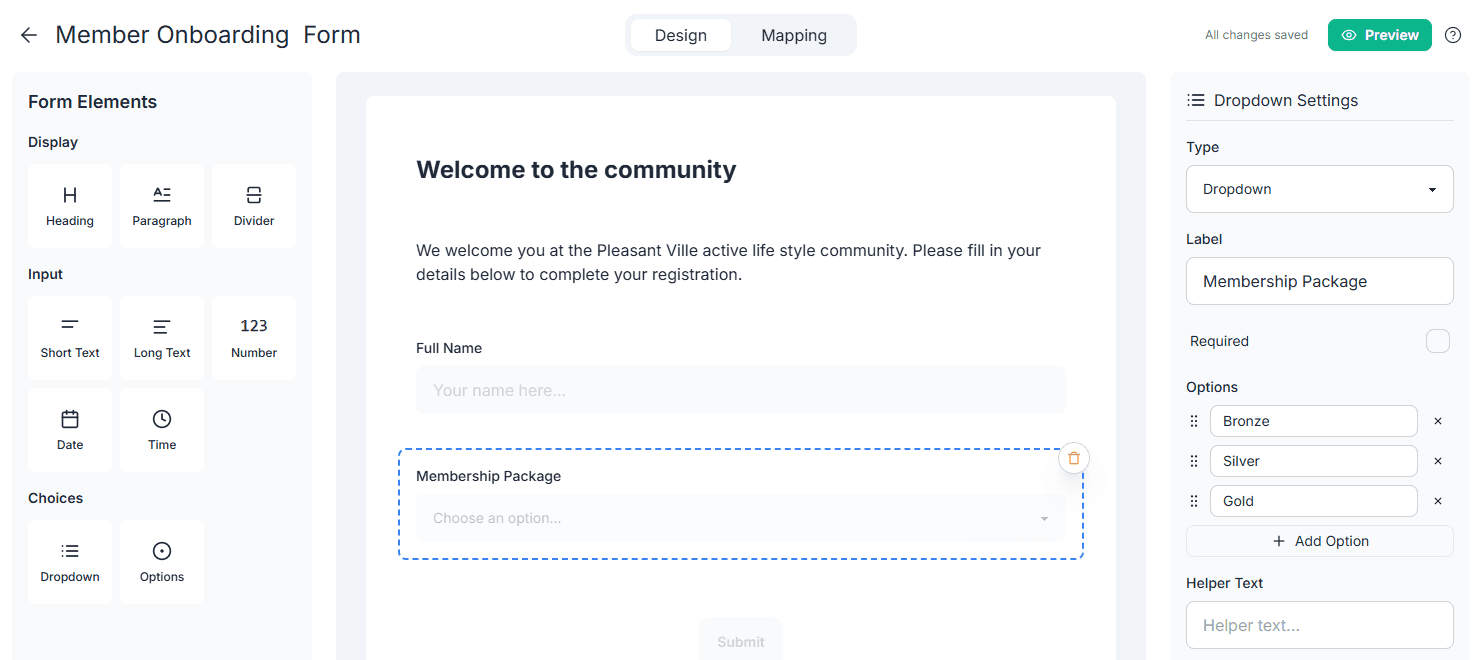
Forms are created using a drag-and-drop, visual editor.
You can:
- Add text, number, date, and choice fields
- Add table fields to collect multiple rows of data
- Reorder fields visually
- Configure labels, helper text, and validation
- Preview the form as users will see it
No code or technical knowledge is required.
Using Form Data in Workflows
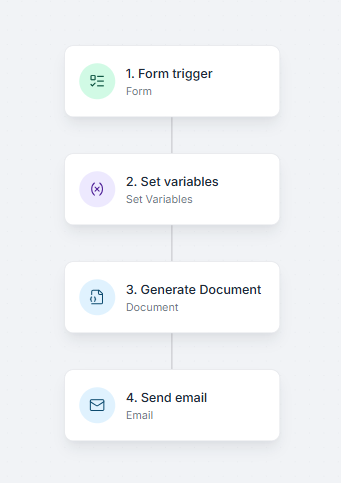
When a form is submitted, the workflow starts and the submitted fields become available to every step in the workflow.
You can use form data to:
- Generate documents from templates
- Apply conditions and calculations
- Personalize emails
- Send data to other systems
For example, a form can collect customer and order details, generate an order confirmation document, and email it to the customer automatically.

Next Steps
- Learn how to generate workflow documents
- Start a workflow for every spreadsheet row with Bulk Generation
- Explore formulas for calculations and transformations
- Read the workflow overview
