Formulas
Formulas let you calculate values, transform data, and make decisions in your workflows. They combine form data, variables, and built-in functions to create dynamic content that adapts to each workflow run.
Formulas can be used anywhere you need computed values - in document tag mapping, email content, HTTP request bodies, and conditional logic.
Using Formulas
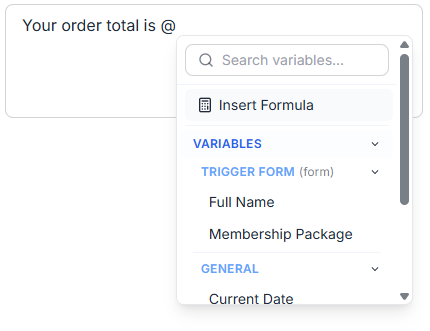
Formulas are entered using a formula editor that provides autocomplete and validation.
Type @ to insert variables, or start typing a function name to see available options.
Formulas can be used in:
- Document tag mapping - Calculate values to populate document templates
- Conditional logic - Evaluate conditions in split and condition nodes
- Email content - Create dynamic subject lines and body text
- HTTP requests - Build request URLs, headers, and body content
- And more...
Expression Types
Math Operations
Formulas support standard mathematical operations:
- Basic arithmetic: Price * 1.1
- Grouping: (Quantity * Price) - Discount
- Functions: SUM(1, 2, 3), AVERAGE(Math Score, English Score), ROUND(Total, 2)
See all Math functions.
Text Operations
Transform and combine text values:
- Concatenation: "Hello " + First Name + " " + Last Name
- Functions: UPPER(Name), TRIM(Address), STARTS_WITH(Text, "start")
See all Text functions.
Date Expressions
Compare, manipulate, and format date values:
- Comparison: IF Due Date >= "2026-01-01" THEN "Current Year" ELSE "Previous Year"
- Functions: DATE_ADD(Start Date, 30, "days"), DATE_DIFF(Submitted At, "2026-01-01", "days")
- Formatting: FORMAT_DATE(End Time, "DD/MM/YYYY")
See all Date functions.
Conditional Logic
Use IF-THEN-ELSE expressions along with comparison and logical operators such as =, !=, >, <, AND, OR, and NOT to create dynamic values based on conditions:
- Simple condition: IF Age >= 18 THEN "Adult" ELSE "Minor"
- Complex logic: IF (Status = "urgent" AND Priority > 5) THEN "High" ELSE "Normal"
- Nested conditions: IF Score > 90 THEN "A" ELSE IF Score > 80 THEN "B" ELSE "C"
Arrays
Work with lists of values - filter, pick specific fields, or sort the results:
- Filter list items: Line Items WHERE price > 10
- Select a specific field: Line Items SELECT quantity
- Sort results: Line Items ORDER BY price DESC
- Add up values: SUM(Line Items WHERE price > 10 SELECT price * quantity)
See the full Arrays reference.
Function Reference
Built-in functions are organized by category:
